

A checkout lane is where every customer's experience ends — and where a store's throughput is either protected or lost. The wrong counter wastes staff motion, slows scanning, and creates bottlenecks that ripple back through the entire floor. The right one moves products smoothly, fits the cashier's workflow, and holds up through thousands of transactions without mechanical issues.
This guide covers how conveyor belt checkout counters work, the main unit types available today, how to match counter dimensions to your store format, and what to verify before placing a bulk order from a manufacturer.
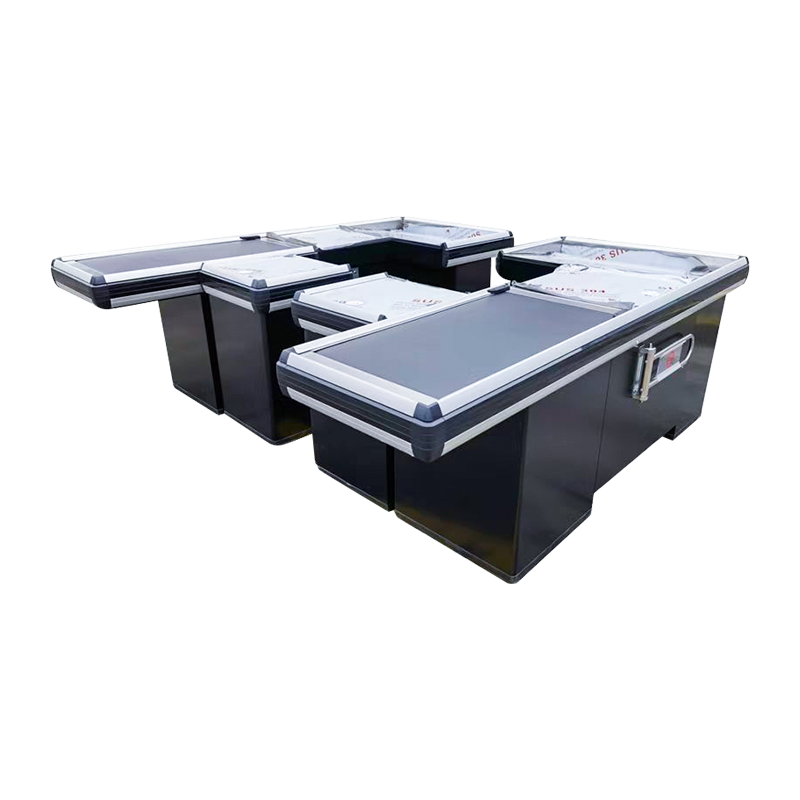
How a Conveyor Belt Checkout Counter Actually Works
The core mechanism is straightforward: an electric motor drives a continuous flat belt across a slider bed, moving items from the customer loading zone toward the cashier's scanning position. The belt runs on demand — either continuously or triggered by a foot pedal or control panel — and stops automatically once items reach the end stop or bagging divider.
Most commercial units are built around a steel frame (typically Q235 cold-rolled steel) with a stainless steel or composite countertop surface at the scanning and bagging end. The belt itself is usually a rubber or PVC mat-top material: low-friction, easy to clean, and resistant to the oils and moisture that accumulate in grocery environments. A lane divider — the plastic bar customers use to separate their items from the next customer's — sits on a track above the belt surface and slides freely as the belt moves beneath it.
The motor is sized for the expected load. Standard supermarket units run on single-phase 220V power and draw between 50W and 120W depending on belt width and length. Speed is typically adjustable, which matters: a belt that runs too fast throws lightweight items; one that runs too slow creates a backup when customers have full trolleys.
At the cashier end, the counter widens into a flat working surface where the operator scans, bags, and processes payment. This zone usually integrates a cash drawer recess, a monitor arm mount, and a barcode scanner holder. The separation between the belt zone and the cashier zone is both physical (a fixed end panel or sensor bar) and operational — the two areas serve different functions and should be dimensioned accordingly.
Three Main Types and What Each Is Built For
Not every conveyor belt checkout counter is the same unit in a different color. The differences in construction, mobility, and payment integration reflect genuinely different operational requirements.
Fixed Heavy-Duty Units
These are the counters built for permanent installation in high-volume environments: large supermarkets, hypermarkets, and wholesale clubs. The frame is heavier gauge steel, the belt is wider (typically 400–500mm), and the overall counter length runs from 2,400mm to over 3,000mm to accommodate full trolley loads. The heavy-duty belt checkout counter built for high-volume retail is the reference unit for this category — designed for anchored installation with reinforced structural support. Floor anchoring is standard, and these units are not meant to be repositioned once installed.
Multi-Payment Integration Units
As payment methods diversify — cash, card, mobile QR, contactless — the checkout counter has to accommodate more hardware at the cashier end. Multi-payment units are built with wider cashier surfaces, integrated cable management channels, and mounting provisions for dual monitors, card reader arms, and secondary customer-facing displays. The multi-payment belt checkout counter with integrated POS support addresses this configuration directly, providing structured hardware mounting without requiring custom modifications on-site. This type is increasingly common in mid-to-large grocery chains that have upgraded to unified POS systems.
Mobile Belt Units
Some retail environments can't commit to permanent checkout positions — seasonal stores, pop-up markets, event venues, or supermarkets that reconfigure their floor layout for promotions. Mobile belt checkout counters are built on lockable casters and use a modular frame that can be repositioned without tools. The tradeoff is that the frame is lighter and the belt length is shorter (typically 1,800–2,200mm) compared to fixed units. The mobile belt checkout counter for flexible store layouts handles this use case, with a 2,500mm footprint that fits standard checkout lane widths while remaining fully repositionable.
Sizing Guide: Matching Counter Dimensions to Your Store Format
Buying the wrong size is one of the most common procurement mistakes with checkout counters. An undersized belt creates a bottleneck at the customer end; an oversized counter wastes floor space and often misaligns with the store's aisle layout. The following table provides a starting reference by store format:
| Store Format | Recommended Belt Length | Recommended Belt Width | Counter Total Length | Notes |
|---|---|---|---|---|
| Small grocery / neighborhood store | 900–1,200mm | 320–380mm | 1,800–2,200mm | Basket traffic; mobile unit often sufficient |
| Mid-size supermarket (500–2,000 m²) | 1,200–1,600mm | 380–430mm | 2,200–2,600mm | Mix of basket and trolley; fixed unit preferred |
| Large supermarket / hypermarket (>2,000 m²) | 1,600–2,000mm | 430–500mm | 2,600–3,200mm | Full trolley loads; heavy-duty fixed unit required |
| Warehouse club / cash-and-carry | 1,800–2,200mm | 480–520mm | 3,000–3,500mm | Oversized items; extra belt width critical |
Counter height is largely standardized at 820–870mm to match cashier ergonomics. One dimension that buyers frequently overlook is the bagging area depth — the flat surface behind the scanning zone where customers pack their bags. In busy stores, an undersized bagging area creates congestion that slows the next customer's items from advancing. A minimum 600mm depth is practical for grocery; 700–800mm is recommended where large-item purchases are common.
Key Spec Checklist Before You Buy
Once you've established the type and size, these are the specifications worth verifying before finalizing a purchase order — particularly when sourcing from a manufacturer rather than a local distributor.
Countertop Material
Stainless steel (typically 304 grade) is the standard for food retail environments. It resists moisture, cleans easily, and doesn't degrade under the disinfectants used in daily maintenance. Composite or MDF-core surfaces with a laminate finish are cheaper but degrade faster in high-humidity environments. If the counter will be used near fresh produce or refrigerated zones, stainless steel is non-negotiable.
Belt Material and Drive Motor
Black rubber mat-top belts are the most common and practical choice — non-reflective under fluorescent lighting, food-safe, and easy to replace. The motor should be fully enclosed (IP54 rating minimum) to withstand cleaning spray. Confirm that the motor and belt are available as separate spare parts; some lower-cost units are manufactured as integrated assemblies that require full counter replacement when a single component fails.
Lane Divider System
The lane divider bar should sit on a recessed track flush with the belt surface so it slides freely without catching on items. Bars with magnetic end-caps that hold to a fixed post at the customer end reduce clutter at the loading zone — a small detail that noticeably speeds up lane turnover in high-volume settings.
Payment Hardware Mounting
Verify that the cashier surface includes cable management channels and pre-drilled mounting positions for POS monitors, scanner stands, and card reader arms. Retrofitting hardware mounts on-site is time-consuming and produces an untidy result. If your POS configuration requires a customer-facing display, confirm that a secondary arm mount is included or available.
Spare Parts Availability
Ask the manufacturer directly: what is the lead time for a replacement belt, motor, and control board? For a store operating 12–16 hours daily, a counter that's out of service for two weeks waiting on parts is a significant operational problem. A reputable manufacturer should hold common wear-parts in stock and be able to ship within a few days.
Conveyor Belt Counter vs. No-Belt Counter: When Each Makes Sense
Not every retail format needs a conveyor belt. The belt adds cost, mechanical complexity, and a larger footprint — in low-traffic environments, those costs aren't recovered through efficiency gains.
A conveyor belt checkout counter delivers measurable value when the average transaction involves more than 8–10 items, or when the store sees sustained queuing during peak hours. In grocery and supermarket environments, this threshold is almost always crossed. The belt eliminates the physical effort of customers manually pushing items forward and removes the awkward pause at the cashier end while a previous customer finishes bagging.
In contrast, convenience store checkout display counters are designed for the opposite transaction profile: small basket sizes, fast turnover, and a compact footprint where the counter also serves as a display surface. For convenience formats where the average purchase is 3–5 items, a flat counter with integrated display cabinetry performs better than a belted unit — it's faster for the cashier, smaller on the floor, and easier to maintain.
The decision isn't about size or budget alone. It comes down to transaction volume per lane and basket size. If either of those numbers is routinely high, a belt pays for itself in throughput.
What to Look for in a Supplier
Sourcing checkout counters from a manufacturer rather than a distributor reduces unit cost and gives you direct access to customization options — but it requires more due diligence upfront.
The first thing to verify is production capacity and lead time. A manufacturer who can deliver 20 units in six weeks is not the same as one who can deliver 200 units in four weeks. Request a production schedule in writing, not just a verbal commitment. For store openings or refits with fixed timelines, this is the single biggest risk factor in the procurement process.
Customization capability matters for most retail chains. Standard catalog dimensions rarely fit every store layout exactly. Confirm that the manufacturer can adjust counter length, modify the cashier surface configuration, apply custom color finishes, and add brand-specific panel graphics without requiring a minimum order of hundreds of units. Manufacturers who hold custom tooling in-house — rather than outsourcing fabrication — can turn around specification changes far more quickly.
After-sale support is the last item and often the least thoroughly vetted. Ask specifically: who handles installation support, what documentation is provided, and how are warranty claims processed across international shipments? A supplier who provides detailed assembly documentation and has an accessible English-language support contact is meaningfully different from one who doesn't, particularly once equipment arrives at a site thousands of kilometers from the factory.
